显示标签为“pokemon selling”的博文。显示所有博文

2016年9月22日星期四

The Complete Beginners Guide of Pokemon Go

Pokemon GO continues to dominate smartphones across the world, as gamers catch, train and battle the little creatures. But for those haven’t experienced the augmented reality (AR) game, it can be extremely confusing. What is a Pokemon? Where are they? How do I catch one? Well, if you've yet to download the app (or have just done so and don't know what to do) we've put together an ultimate beginner's guide to understanding the game. Like any role-playing game (RPG) the more time you put into it the better your character (and your Pokemon) will become.

image

First of all, get Pikachu as you starting the game.

1. ABOUT POKEMON GO
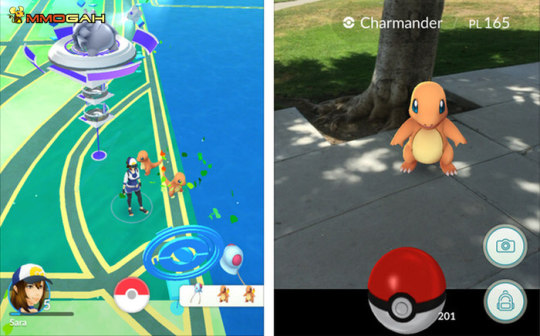
Pokemon Go is an Augmented Reality MMO game, which allows players to Capture, Trade (Trading TBD) and Battle virtual creatures (Pokemon) in the real world. Pokemon Go can be played on Mobile Devices and requires both GPS and an Internet connection to play.
There's more than one way to play Pokemon GO. You can either focus on catching all 150 different types of Pokemon and completing your Pokedex (basically an in-game encyclopedia).
Alternatively, you can focus on becoming as powerful as you can - which means levelling up your character and the Pokemon you catch. It also means you'll need to take part in Pokemon gym fights.
image

2. REQUIREMENTS & DOWNLOAD
Before you download Pokemon Go, be sure to check if your device meets the necessary specifications and requirements.
2.1 Requirements
Pokemon Go requires an Android or IOS Device with GPS and Internet access (WiFi or Mobile Data) to play. Android devices must have version 4.3 or higher and IOS users must have an iPhone 5 or better. Not sure if you meet the requirements? Learn which OS your phone is currently running.
2.2 Downloading the Game
The game can be downloaded in either the Google Play App Store (Android users) or the iTunes App Store (IOS users). Depending on your device, simply head over to either Virtual Store or search Apps for “Pokemon Go”. Click on “Install” and you should be good to go.
Be sure to have at least 200MB of free storage space to download the App. The initial download is around 50MB, but there’ll need more space for new updates to download as well.
If the storage space on your device is insufficient you will be prompted with a message upon the attempted download. Simply delete unused files (Apps, Pictures, Videos, etc.) or clear your Cache to free up the necessary space.
More deails: https://www.mmogah.com/news/title/beginner-s-guide-of-pokemon-go

2016年8月26日星期五

The Most Useful Tips of Fast Hitting Lv25 in Pokemon Go


image

It’s been nearly two months since the launch of the app that the whole world is talking about. Now, players in over 50 countries can enjoy Pokemon Go. The smartphone game has made Nintendo more valuable than Sony in less than a week, forced both US presidential nominees to mention the word ‘Pokemon’ in their speeches, and even taught social skills to young people with autism. Pokemon is one of the most popular mobile phone game now, and the whole world is crazy about it, folks urgently find all kinds of tips to do themselves a favor.

There’s tips everywhere. There’s tips about how to level fast. There’s tips about how to get Pikachu as your starter Pokemon. And there’s tips about how to find Pokemon near you by looking at the fiddly steps counter thingy on the bottom right hand side of your screen.

But Why I Want to Recommend This to You? As a professional pokemon go boosting site, Mmogah thinks the following tips written by Matthew Wu are very useful and I saw them from http://www.gizmodo.com.au/2016/07/five-actually-useful-pokemon-go-tips-from-five-level-25-players/. Most players like me hit level 25 a few days based on the key tips, here let’s see these tips you may not have seen over the Internet yet.